The JavaScript interview handbook
The fourteen topics that come up in almost every front-end interview, with the short answer, the code, and the follow-up question the interviewer is really waiting for.
I have sat on both sides of enough front-end interviews to notice that the technical half is remarkably repetitive. The same fourteen topics come up, in roughly the same order, and each one has a short correct answer and a longer answer that gets you the offer.
This is my notebook for all fourteen, written out properly. Read it end to end the week before an interview, or jump to whichever chapter you are shaky on.
Table of contents
- Array methods
- var, let and const
- Hoisting
- Equality: == versus ===
- The this keyword
- call, apply and bind
- Local storage and session storage
- Timers
- The event loop
- Promises
- async / await
- Closures
- Prototypes
- Debouncing and throttling
Array methods
Almost every interview opens here, because it is a cheap way to find out whether you write loops or transformations. The four that matter are map(), filter(), reduce() and find().
map()
map() walks an array and returns a new array of the same length,
built from whatever the callback returns.
const prices = [12, 18, 40];
const withTax = prices.map((price) => price * 1.21);

console.log(withTax); // [14.52, 21.78, 48.4]
console.log(prices); // [12, 18, 40] — untouched
The follow-up question is always about that second line. map() does not
mutate; it produces. If you find yourself calling map() and ignoring
the result, you wanted forEach().
filter()
filter() returns a new array containing only the elements for which
the callback returned a truthy value. The length changes, the elements
do not.
const users = [
  { name: 'Ada', active: true },
  { name: 'Grace', active: false },
  { name: 'Alan', active: true },
];

const active = users.filter((user) => user.active);
console.log(active.length); // 2
reduce()
reduce() folds an array down to a single value. It takes an
accumulator, the current element, and an initial value — and the initial
value is the part people forget.
const items = [
  { label: 'Keyboard', total: 89 },
  { label: 'Cable', total: 12 },
  { label: 'Stand', total: 45 },
];

const total = items.reduce((sum, item) => sum + item.total, 0);
console.log(total); // 146
Leave off that 0 and an empty array throws a TypeError instead of
returning zero. That single character is the most common bug in
production code that uses reduce().
reduce() is also how you group things without reaching for a library:
const byLetter = ['apple', 'apricot', 'banana'].reduce((groups, word) => {
  const key = word[0];
  groups[key] ??= [];
  groups[key].push(word);
  return groups;
}, {});

console.log(byLetter); // { a: ['apple', 'apricot'], b: ['banana'] }
find() and findIndex()
find() returns the first matching element, or undefined.
findIndex() returns its position, or -1. Both stop as soon as they
hit a match, which is the reason to prefer them over filter()[0].
const first = users.find((user) => !user.active);
console.log(first.name); // 'Grace'
The difference between map() and forEach()
Expect this one verbatim.
map() returns a new array; forEach() returns undefined.
map() is for transforming; forEach() is for side effects.
map() can be chained; forEach() ends the chain.
var, let and const
Three declarations, three different behaviours, and one of them is a historical accident.
var
var is function-scoped and hoisted, which produces the classic
surprise:
function demo() {
  if (true) {
    var message = 'inside the block';
  }
  console.log(message); // 'inside the block'
}
The if block did not create a scope. var also allows redeclaration
in the same scope without complaint, which is how two people can define
the same variable in a 400-line file and never find out.
let
let is block-scoped and may be reassigned but not redeclared:
let count = 0;
count = 1; // fine
// let count = 2;  // SyntaxError: already declared
const
const is block-scoped and cannot be reassigned. It does not make
the value immutable — a distinction interviewers love:
const config = { theme: 'light' };
config.theme = 'dark'; // allowed, the binding did not change
// config = {};        // TypeError: assignment to constant variable
The rule I actually follow: const everywhere, let when you genuinely
reassign, var never.
Hoisting
Declarations are processed before any code runs. What differs is what the name holds at that point.
console.log(a); // undefined — declared, not yet assigned
var a = 1;

console.log(b); // ReferenceError: cannot access 'b' before initialization
let b = 2;
let and const are hoisted too, but into the temporal dead zone:
the binding exists and is unusable until the declaration is evaluated.
Saying that phrase out loud is usually enough to move the conversation
on.
Function declarations hoist completely; function expressions do not:
greet(); // 'hello'
function greet() {
  console.log('hello');
}

speak(); // TypeError: speak is not a function
var speak = function () {
  console.log('hi');
};
== versus ===
=== compares type and value. == coerces first, using a table nobody
has memorised on purpose.
0 == '0'; // true
0 == []; // true
'0' == []; // false
null == undefined; // true
null === undefined; // false
NaN == NaN; // false
Use === everywhere. The one defensible == is value == null, which
is a compact way of saying “null or undefined” — and even that reads
better as value ?? fallback.
For the genuinely hard cases:
Object.is(NaN, NaN); // true
Object.is(0, -0); // false
The this keyword
this is decided by how a function is called, not where it is
written. Four rules, checked in order:
- Called with
new→thisis the new object. - Called with
call,applyorbind→thisis what you passed. - Called as a method,
obj.fn()→thisisobj. - Anything else →
undefinedin modules and strict mode,globalThisotherwise.
const counter = {
  count: 0,
  increment() {
    this.count += 1;
  },
};

counter.increment();
console.log(counter.count); // 1

const loose = counter.increment;
loose(); // TypeError: cannot read properties of undefined
Arrow functions have no this of their own; they close over the one in
scope where they were written. That is why the callback below works and
the function version does not:
class Ticker {
  ticks = 0;

  start() {
    setInterval(() => {
      this.ticks += 1; // `this` is still the Ticker
    }, 1000);
  }
}
call, apply and bind
Three ways to set this explicitly. The differences are small and
almost always asked together.
function describe(role, team) {
  return `${this.name} — ${role}, ${team}`;
}

const person = { name: 'Ada' };

describe.call(person, 'engineer', 'platform'); // arguments listed
describe.apply(person, ['engineer', 'platform']); // arguments in an array
const bound = describe.bind(person); // returns a new function
bound('engineer', 'platform');
call invokes immediately, arguments one by one.
apply invokes immediately, arguments as an array.
bind invokes nothing; it returns a bound copy.
bind also does partial application, which is a nice thing to mention:
const asEngineer = describe.bind(person, 'engineer');
asEngineer('platform'); // 'Ada — engineer, platform'
Local storage and session storage
Both are synchronous key/value stores, both hold strings only, both are scoped to the origin. The difference is lifetime.
Local storage
Survives reloads and browser restarts until something removes it.
localStorage.setItem('theme', JSON.stringify({ accent: 'blue' }));

const stored = JSON.parse(localStorage.getItem('theme') ?? '{}');
localStorage.removeItem('theme');
Session storage
Same API, cleared when the tab closes. A duplicated tab gets a copy; a new tab gets nothing.
Three things worth saying without being asked:
- Both are synchronous and block the main thread — do not put a megabyte of state in there.
- Both throw in private browsing modes and when the quota is exceeded,
so every access belongs in a
try. - Neither is a place for tokens you would mind a script reading.
Timers
setTimeout schedules one run after a delay; setInterval schedules
repeated runs. Neither promises the delay you asked for — they promise
at least that delay, once the stack is clear.
const id = setTimeout(() => console.log('later'), 200);
clearTimeout(id);

const tick = setInterval(() => console.log('tick'), 1000);
clearInterval(tick);
The interesting version of the question is why the loop below logs three
threes with var and zero-one-two with let:
for (var i = 0; i < 3; i++) {
  setTimeout(() => console.log(i)); // 3, 3, 3
}

for (let j = 0; j < 3; j++) {
  setTimeout(() => console.log(j)); // 0, 1, 2
}
var has one binding shared by every callback. let creates a fresh
binding per iteration.
The event loop
The one that separates “I use promises” from “I know what they do.”
JavaScript runs one thing at a time on one stack. Anything asynchronous is handed off, and its callback is put in a queue. When the stack empties, the loop drains every microtask, then takes one macrotask, then repeats.
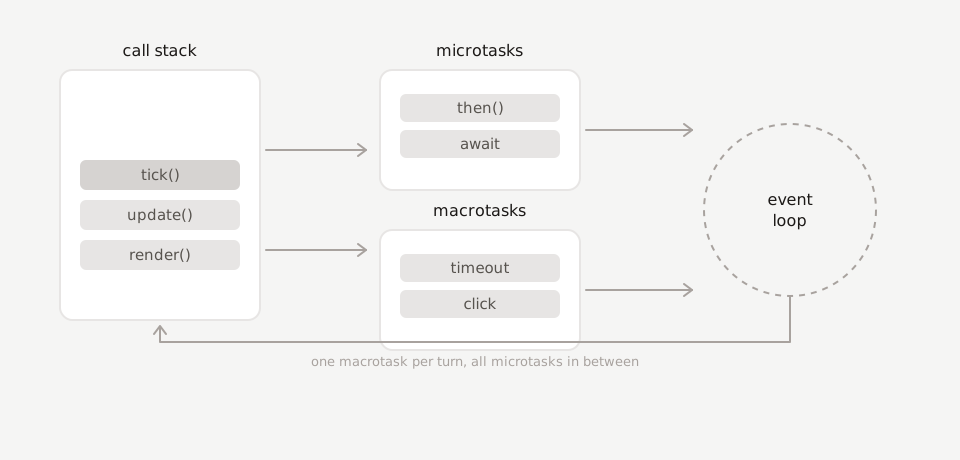
Microtasks are promise callbacks and queueMicrotask. Macrotasks are
timers, I/O and events. Which is why this prints in an order that
surprises people the first time:
console.log('1');

setTimeout(() => console.log('2'));

Promise.resolve().then(() => console.log('3'));

console.log('4');

// 1, 4, 3, 2
Synchronous code first, then the microtask, then the timer — even with a zero delay.
An endless stream of microtasks starves the macrotask queue entirely. That is how a page with no infinite loop still manages to freeze.
Promises
A promise is an object representing a value that is not here yet. It is pending, then either fulfilled or rejected, and it never changes again.
function loadUser(id) {
  return fetch(`/api/users/${id}`).then((response) => {
    if (!response.ok) throw new Error(`HTTP ${response.status}`);
    return response.json();
  });
}

loadUser(7)
  .then((user) => console.log(user.name))
  .catch((error) => console.error(error))
  .finally(() => console.log('done either way'));
Know the four combinators, because at least one always comes up:
Promise.all([a, b]); // all fulfil, or reject on the first failure
Promise.allSettled([a, b]); // never rejects; array of status objects
Promise.race([a, b]); // settles as the first one settles
Promise.any([a, b]); // first fulfilment; rejects only if all reject
Promise.all for “I need all of these”, allSettled for “tell me how
each one went”, race for timeouts.
async and await
async/await is promise plumbing with the shape of ordinary code. An
async function always returns a promise, and await pauses it until
the awaited promise settles.
async function loadDashboard(id) {
  try {
    const [user, invoices] = await Promise.all([loadUser(id), loadInvoices(id)]);
    return { user, invoices };
  } catch (error) {
    console.error('dashboard failed', error);
    return null;
  }
}
The mistake to avoid — and the one interviewers plant — is awaiting in a loop when the calls are independent:
// serial: three round trips, one after another
for (const id of ids) {
  results.push(await loadUser(id));
}

// parallel: one round trip's worth of waiting
const results = await Promise.all(ids.map(loadUser));
Closures
A closure is a function that keeps access to the scope it was created in, even after that scope has returned.
function makeCounter() {
  let count = 0;
  return {
    increment: () => (count += 1),
    value: () => count,
  };
}

const counter = makeCounter();
counter.increment();
counter.increment();
console.log(counter.value()); // 2
count is unreachable from outside and still alive. That is the whole
idea, and it is what every module pattern, every memoiser and every
debounce is built on:
function once(fn) {
  let called = false;
  let result;
  return (...args) => {
    if (!called) {
      called = true;
      result = fn(...args);
    }
    return result;
  };
}
Prototypes
Every object has a hidden link to another object. Look up a property
that is not there, and the engine follows the link, and the next, until
it finds it or reaches null.
const base = {
  greet() {
    return `hello, ${this.name}`;
  },
};

const user = Object.create(base);
user.name = 'Ada';

console.log(user.greet()); // 'hello, Ada'
console.log(Object.hasOwn(user, 'greet')); // false — it came from base
class is syntax over exactly this:
class Animal {
  constructor(name) {
    this.name = name;
  }
  speak() {
    return `${this.name} makes a sound`;
  }
}

class Dog extends Animal {
  speak() {
    return `${super.speak()}, specifically a bark`;
  }
}
Methods live on Animal.prototype, not on each instance — which is why
ten thousand instances do not cost ten thousand copies of speak.
Debouncing and throttling
Two ways to stop an event firing more often than you can afford, and a frequent live-coding request.
Debounce waits for the noise to stop, then runs once:
function debounce(fn, wait = 200) {
  let timer;
  return (...args) => {
    clearTimeout(timer);
    timer = setTimeout(() => fn(...args), wait);
  };
}
Throttle runs at most once per interval, whatever happens in between:
function throttle(fn, interval = 200) {
  let last = 0;
  return (...args) => {
    const now = Date.now();
    if (now - last < interval) return;
    last = now;
    fn(...args);
  };
}
Search-as-you-type is a debounce. Scroll position and pointer tracking are throttles. Saying which one you would use, and why, matters more than the implementation.
How to actually use this
Do not memorise the code. Retype it. Every one of these snippets is under twenty lines, and typing them from memory once is worth reading them five times.
Then, for each chapter, prepare the second answer — the one that starts “the reason that matters in practice is.” That answer is what the interview is for.